WINDOWS 10 AND 11
It names every path before it touches one.
The usual bargain with a cleanup tool is that you approve a deletion you have not seen. Start with --scan. It deletes nothing.
Nothing goes until you have seen its path.
Windows 10 and 11 · PowerShell 5.1 · nothing to install
It names every path before it touches one.
windowsweep reclaims the disk space that quietly disappears on a Windows machine: package and build caches, browser and app caches, Windows temp and update leftovers, stale node_modules, half-finished downloads. It keeps the caches you used recently. Documents, credentials and browser profiles stay protected. A separate scanner offers large or old files in Downloads and folders you add, and recycles only those you select.
The usual bargain with a cleanup tool is that you approve a deletion you have not seen. Start with --scan. It deletes nothing.
Read-only. It measures every declared target and removes nothing.
or
Download the desktop app (opens in a new tab)windowsweep_1.4.1_x64-setup.exe · 2,762,709 bytes · released 2026-11-03. The installer is not signed with a paid code-signing certificate, so SmartScreen warns on first run. Every release publishes a SHA-256 checksum and a minisign signature the app's own updater checks; neither is a code-signing certificate.
One machine, one run · 7 September 2026
One authorised run, on one Windows machine, on one day. That is the whole claim. It is not an average and it is not a promise, because your disk decides the number and --scan is how you read it.
The ticks are evenly spaced because the per-section split was never recorded. They count the sections; they do not size them.
- Sections that reported
- 11
- Drive
- C:
The two numbers on this page do not agree, and that is expected.windowsweep counted 3,924,712,402 bytes removed, which is 3.66 GB. Windows reported free space on C: rising from 5.84 GB to 9.85 GB, a gain of 4.01 GB. The tool counts what it deleted. Windows counts what is free, a moment later, on a volume other programs are also writing to. Printing one round number would hide that gap rather than close it.
The same figures as a table
| Measurement | Value |
|---|---|
| Free on C:, before | 5.84 GB |
| Free on C:, after | 9.85 GB |
| Free space gained | 4.01 GB |
| Bytes removed, as windowsweep reported them | 3,924,712,402 bytes |
| Sections that reported a result | 11 |
| Refusals | 0 |
How a run goes
Nothing goes until you have seen its path.
Three commands, in order. The first two write nothing of yours.
Scan. Read-only.
Every declared target is measured and nothing is touched. You get sizes, section by section, before you have agreed to anything.
[ 1] Package-manager caches 2.41 GB [ 7] Browser caches 1.02 GB [10] User temp 318 MBDry-run. Still writes nothing of yours.
Every deletion helper short-circuits and every destructive external command is skipped. You see the paths a real run would remove and an estimate of space reclaimed. It writes two files of its own, a log and a report. None of yours. The self-test compares a fixture snapshot before and after a dry-run.
would remove C:\Users\you\AppData\Local\npm-cache\_cacache would remove C:\Users\you\AppData\Local\Yarn\Cache\v6 refused C:\Users\you\Documents (protected subtree)Run. Now it deletes.
Caches go permanently, because they rebuild. Personal files you selected go to the Recycle Bin, where Windows keeps the undo. Emptying the Recycle Bin and clearing event logs have no undo and need a deep-run flag. A selected program uninstall has no undo either.
removed 3,924,712,402 bytes across 11 sections skipped Chrome is running — close it and re-run section 7
The safety model
A list of things it will not do.
Not adjectives. Every refusal below is counted, enumerated and printed on demand by --list-targets. No flag lifts one of them.
Your files
Documents, Pictures, Music, Videos, Desktop, Contacts, Favorites, Links, Saved Games, Searches and 3D Objects, with OneDrive, Dropbox, Google Drive and iCloud Drive beside them. Refused unconditionally. No flag, no profile and no configuration file reaches any of them.
Your credentials and agent state
.ssh .gnupg .aws .azure .kube .gcloud .docker .secrets .config .local .claude .codex .agents .gemini .copilot .ollama
Toolchains and installed software
npm globals, nvm, Volta, fnm, corepack, the pnpm global store, bun, deno, cargo and go binaries, .rustup, Programs, WindowsApps, the Android SDK, JetBrains Toolbox. The caches these tools keep are fair game. The tools are not.
Browser profiles
Cookies, logins, history, bookmarks, extensions, Local Storage, IndexedDB, Sync Data, Preferences. A profile is refused twice over: once because its path is protected, and again because its folder name is not on the allowlist of cache folders this tool knows how to clear.
Editor state
settings.json · keybindings.json · snippets · globalStorage · local History
Windows itself
Prefetch, because clearing it slows the next boot. Windows\Installer, WinSxS, System Volume Information, the registry hives, and the page and swap files.
Anything reached through a link
The walker reads the reparse-point attribute before it descends, so a junction or symlink is removed as a link and its target is never entered. The self-test proves that with a real junction and a path longer than 260 characters on your machine.
Anything outside the section's own declared root
Every deletion asserts that the path lies strictly inside the target root its calling section declared. A section cannot reach into another section's territory, or out of the tool's, by accident.
Two file helpers
Files it removes itself pass the same checks.
These helpers apply six ordered refusals. Windows tools that windowsweep calls perform their own actions, which a dry-run skips.
candidate paththe gatedelete
Remove-PathSafe and Send-ToRecycleBin guard file paths the engine removes itself.
- Traversal. Paths with .. segments, UNC paths and drive roots are refused outright.
- Roots. Fifteen declared entries. Windows, System32, SysWOW64, both Program Files folders, ProgramData, C:\Users with its Default and Public profiles, %PUBLIC%, your profile root, its AppData folder and the Roaming, Local and LocalLow folders inside it.
- Protected lists. Sixty-six subtrees, fifty patterns and thirteen file names, with two declared exceptions tested first, so they are a carve-out rather than an oversight.
- The tool's own data. The one step a flag can lift, by --prune-history or --uninstall-data, which exist to delete windowsweep's own logs.
- Your own exclusions. --exclude-path names a tree and every section refuses it, logged line by line and listed in the --json summary.
- Containment. The path must lie strictly inside the target root the calling section declared.
Two declared exceptions admit only superseded Codex releases and named browser cache leaves. Your exclusions still hold. --purge-all changes how much of a cache goes, not which paths are protected.
What comes back
Six tiers, and one of them is permanent.
Most caches rebuild the next time you need them. Emptying the Recycle Bin and clearing event logs are permanent and deep-gated. Section 26 runs only the program uninstallers you select; that action is permanent too.
| Tier | Sections | Can you get it back? |
|---|---|---|
| Rebuilds | 1 2 3 5 6 7 8 9 10 12 13 14 17 28 | The data reappears on demand. A rebuild costs time, not information. |
| Slow to rebuild | 4 | Android emulator images. Recreate them in Android Studio; the per-AVD idle gate exists for this reason. |
| Recycle Bin | 18 19 23 27 | Yes, until you empty the bin. Section 19 always recycles selected files; other sections may offer permanent removal. |
| Report only | 0 21 22 24 25 | Nothing is removed, so there is nothing to recover. |
| Permanent | 11 16 26 | No. Emptying the Recycle Bin, clearing event logs and running a selected program uninstaller have no undo. |
| Configuration | 15 20 29 | Hibernation is reversible with powercfg /hibernate on; disk-image compaction loses nothing. Section 29 sets a persistent Chrome policy. |
The catalogue
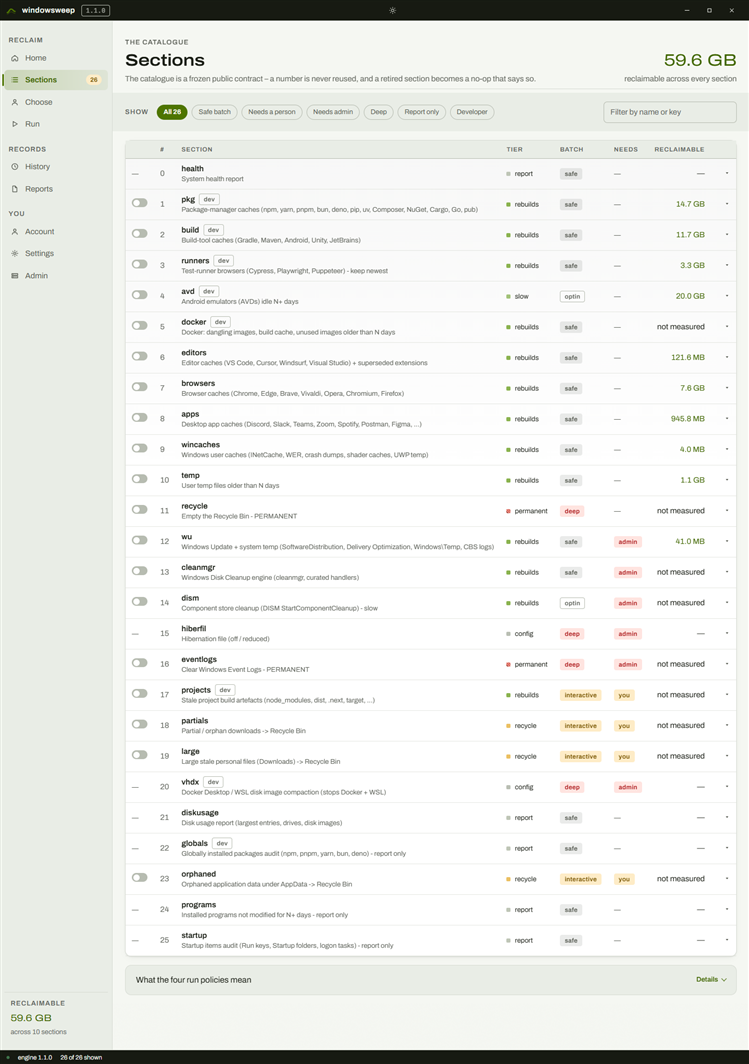
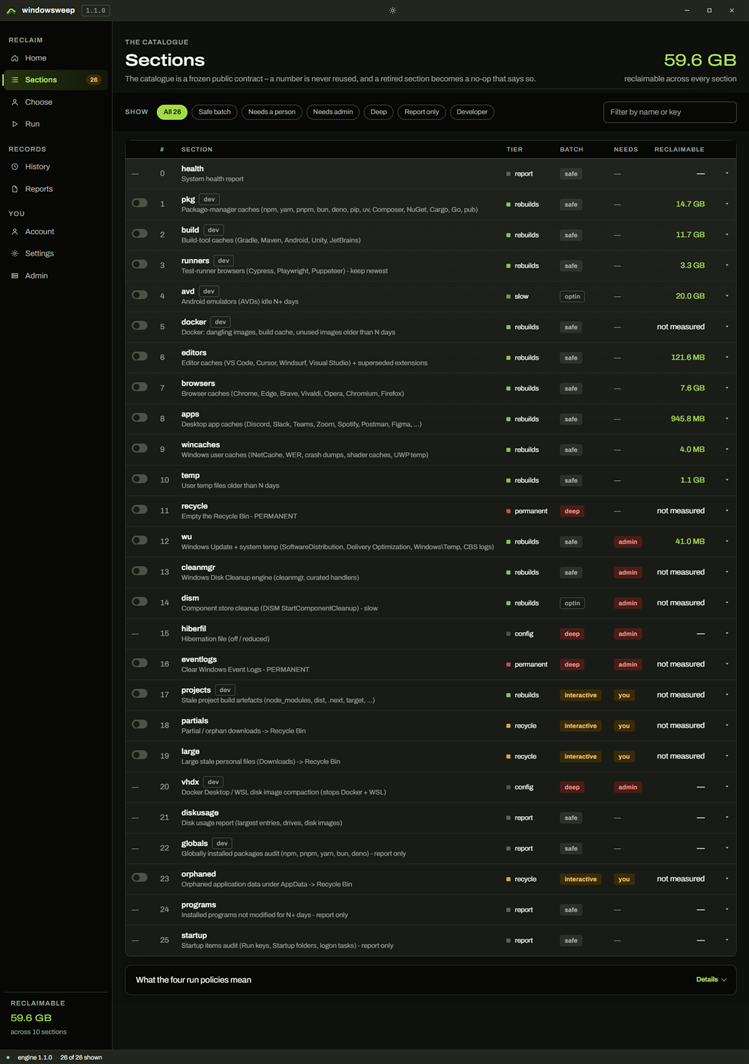
Thirty numbered sections, 0 to 29.
The numbers are a public contract. A section can be retired as a no-op that says so; it is never renumbered, so a script pinned to --only 7 keeps meaning what it meant.
Each section's exact paths, flags and behaviour live in the documentation — the sections reference (opens in a new tab). This site links there and never duplicates it.
Developer mode
One question, on the first run.
A cleaner that clears every cache it finds trades one problem for another: the next yarn install downloads all of it again. So windowsweep asks once, remembers the answer and changes what seven of the sections do with it.
Caches you used recently are kept.
The idle gate applies. A cache file goes only when its newest timestamp is at least 100 days old, and the newest version of every versioned tool is never removed: Cypress, Playwright, Gradle distributions, Squirrel builds.
Windows disables last-access updates on most volumes, so the tool reads the newest of three timestamps and errs towards "recently used". It keeps more than it strictly needs to. Never less.
If you would rather not type
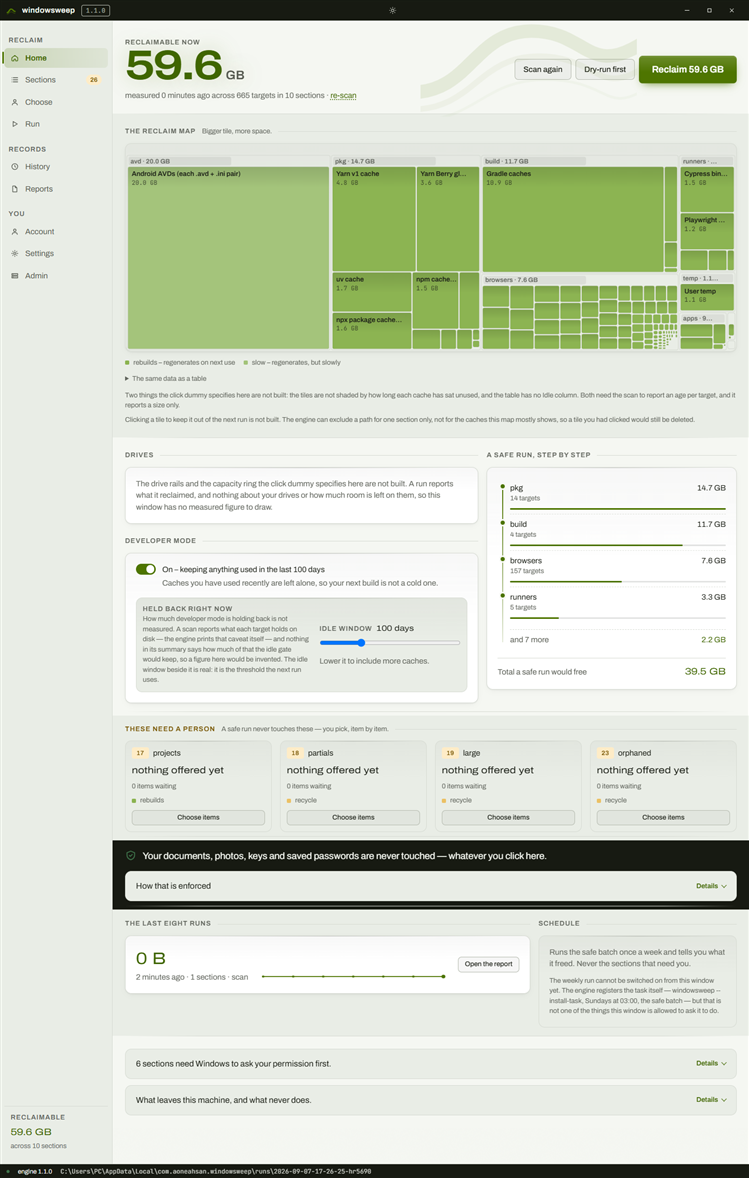
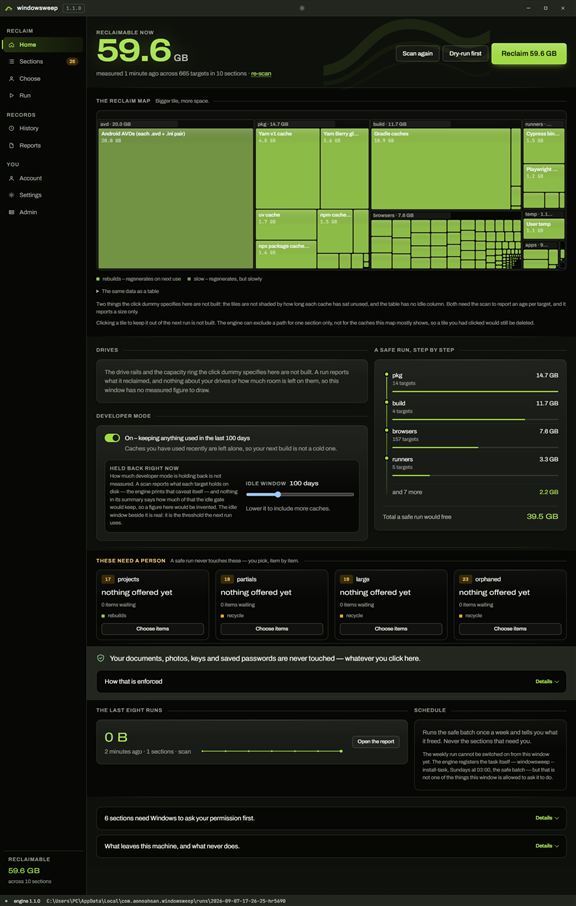
The same engine, in a window.
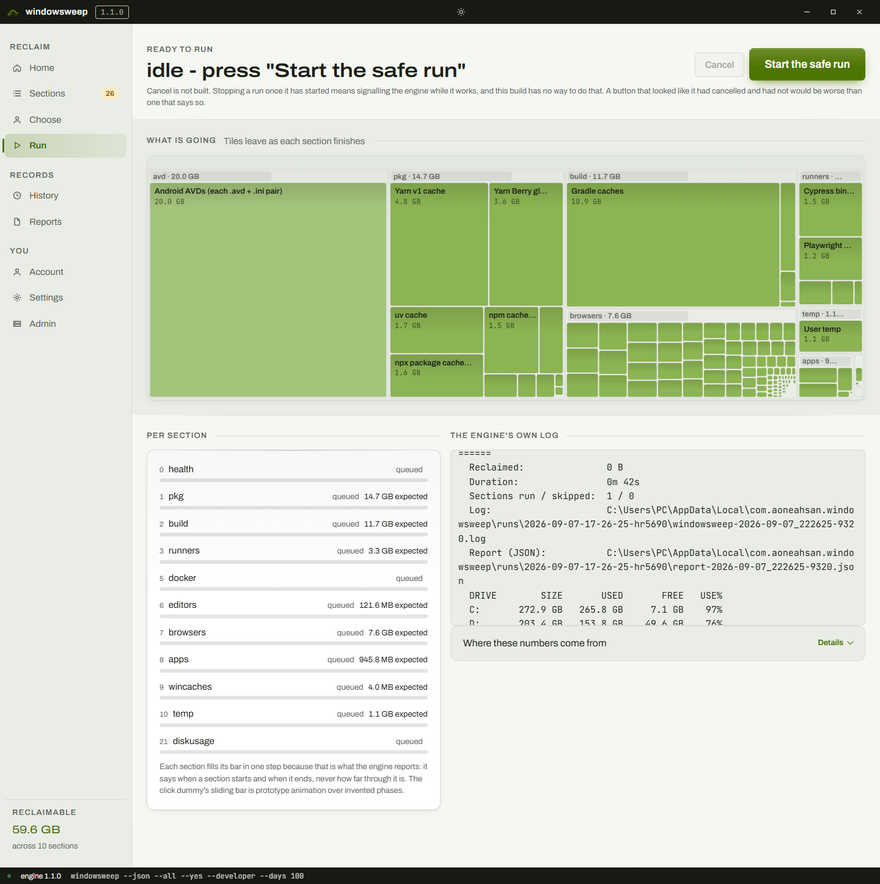
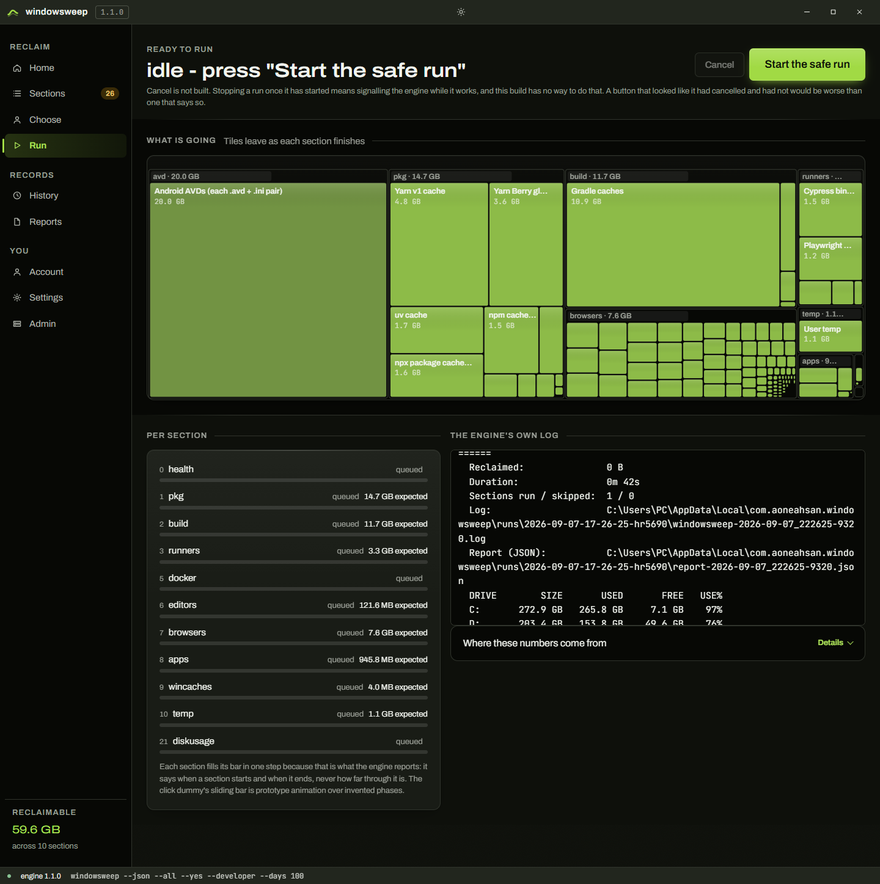
The desktop app runs the same PowerShell script with --json --no-color and reimplements no cleanup logic at all. What it adds is a picture of what is about to happen.
What leaves your machine
Two answers, for three programs.
The window runs the same engine, and it is still a different program; this website is a third. What leaves your machine depends on which of the three you are using. The site gives the window's answer, not the engine's.
The command line sends nothing.
- No telemetry.
- No update check.
- No network calls of any kind. Self-test check [9] greps the source for HTTP and socket calls and fails the build if it finds one.
Crash bundles stay on disk. Session logs and reports stay on disk. It opens a browser only when you ask: to read a report, or to report an issue.
The desktop window and this website do send analytics.
- Usage events go to Google Analytics 4, Amplitude and Microsoft Clarity. Errors go to Sentry.
- Clarity records session replays: your interactions with the interface, not the contents of your disk.
- There is no switch. This is a notice, not a consent request.
Never a file path, never your user name, never the contents of anything. If you want a cleanup that transmits nothing at all, that is the command line, and it is the same engine.
Three tools, one idea
The other two machines you own.
windowsweep
PowerShell 5.1 with a Node launcher. You are here.
linux-cleanup
Bash. The same refusal-first idea.
(opens in a new tab)macOSmacleanup
Bash. The same refusal-first idea.
(opens in a new tab)npm refuses to install windowsweep off Windows — os: ["win32"] — so there is no half-working install to discover later.
Also by the same team
Other things built here.
Not advertising. These are the same team's own projects, and there is no ad network on this site. That sentence is the promise: adding one would mean deleting it first. Which is the only kind of promise worth writing down.
- VVideo Controls PlusTake complete control of any HTML5 video. (opens in a new tab)
- ZZToolsA toolbox of developer and creator utilities, one click away. (opens in a new tab)
- CClearHireBuild a sharper resume and get discovered. (opens in a new tab)
- LLifeWellTrack your health, your way. (opens in a new tab)
- LLabFlowRun your diagnostic lab end to end. (opens in a new tab)
- PPregnancyPalA calm companion through every week. (opens in a new tab)
- SSMS AppSend SMS at scale from your own Android device. (opens in a new tab)
- NNative UpdateShip Capacitor app updates without the store wait. (opens in a new tab)
- FFilesHubFile storage and 70+ developer utilities behind one API key. (opens in a new tab)
- HHabitForgeTurns consistency into a rope you can see. (opens in a new tab)
- TTrizLinkShort links, link-in-bio and click analytics. (opens in a new tab)
- Llinux-cleanupSafe, developer-aware Linux disk and cache cleanup. (opens in a new tab)
- MmacleanupSafe-by-default macOS cleanup and maintenance. (opens in a new tab)
- SStrata StorageOne storage API over localStorage, IndexedDB, cookies and native. (opens in a new tab)
Before you run it
The questions this tool actually gets.
Will it delete my files?
Not by accident, and not by any flag. Your profile folders, cloud-sync folders, credentials and browser profiles are on the protected list, and no flag lifts the deletion gate's protected lists, its declared roots or its containment check.
Sections 18, 19, 23 and 27 offer files or leftover folders for review. Section 19 scans Downloads and folders you add for large or old files. Each shows a list, defaults to nothing selected and asks a final question that --yes does not answer. What you pick goes to the Recycle Bin.
What can I never get back?
Emptying the Recycle Bin (11) and clearing event logs (16) have no undo. Both are deep-gated. Uninstalling a chosen program (26) is permanent too.
Caches removed from the rebuild tiers are gone permanently too, but they come back the next time the tool that owns them runs. That costs time, not information.
Do I need Administrator rights?
Sections 12 to 16, 20, 27 and 29 need administrator permission. A machine-wide uninstall in section 26 needs it as well. Without elevation they skip; --elevate relaunches through a UAC prompt.
How do I check it before trusting it?
windowsweep --self-test runs its checks on your machine. A real junction, a path longer than 260 characters and a dry-run fixture whose snapshot is compared before and after prove the guards.
windowsweep --list-targets prints every path the tool can reach, grouped by section, plus the protected list as the running script sees it. Read it before you run anything. That is what it is for.
Can I run it on a schedule?
Yes, for the safe batch: --all --yes from a Scheduled Task. The interactive sections never run unattended unless you name the exact items in advance with --select or --select-file. A scripted selection is a person's choice, made earlier.
What about Windows Server, Linux and macOS?
Server 2019 and later should work. The engine uses nothing newer than Windows 10 1809, but no real cleanup has been verified on Server.
Linux and macOS have their own tools; npm refuses to install this one there.
Everything above in more depth: the documentation (opens in a new tab).
Say something
Found a bug, or a path it should know about?
Sending a message needs an account, so that a reply has somewhere to go and so the inbox is not a spam target. It is the same account the desktop app signs into.
Start here
The first command deletes nothing.
Run it, read what it found, and decide afterwards. That order is the whole design.
If you would rather not type, the desktop app is the same engine in a window, and the deletion gate refuses exactly the same paths.
Windows 10 (1809 and later) and Windows 11 · Node 14+ for npx only · no runtime dependencies.